

Unit II: Key-Value Databases - Redis
Complete Student Guide | BE Software Engineering | NoSQL Databases
How to use this guide: Every section includes prerequisite callouts, real-world examples, code blocks, and visual diagrams.
Table of Contents
2.1 Introduction to Key-Value Databases
2.1.1 Concept and Architecture
Prerequisite: Recall that relational databases (MySQL, PostgreSQL) store data in structured tables with rows and columns and use SQL. Key-Value databases are fundamentally different — think of them like a giant
HashMapor dictionary in programming.
What is a Key-Value Database?
A key-value database stores data as pairs of a unique key and its associated value — exactly like a dict in Python or a HashMap in Java.
Analogy — Gym Locker System:
Think of a gym locker room. Each locker has a unique number (the KEY) and whatever you store inside is the VALUE. If you know the locker number, you retrieve your belongings in O(1) time — no searching through every locker.
KEY                          VALUE
─────────────────────────    ──────────────────────────────
user:1001:name           →   "Alice"
session:abc123           →   "{userId: 1001, role: admin}"
product:iphone15:price   →   "1299"
leaderboard              →   [sorted list of players]
Redis Architecture
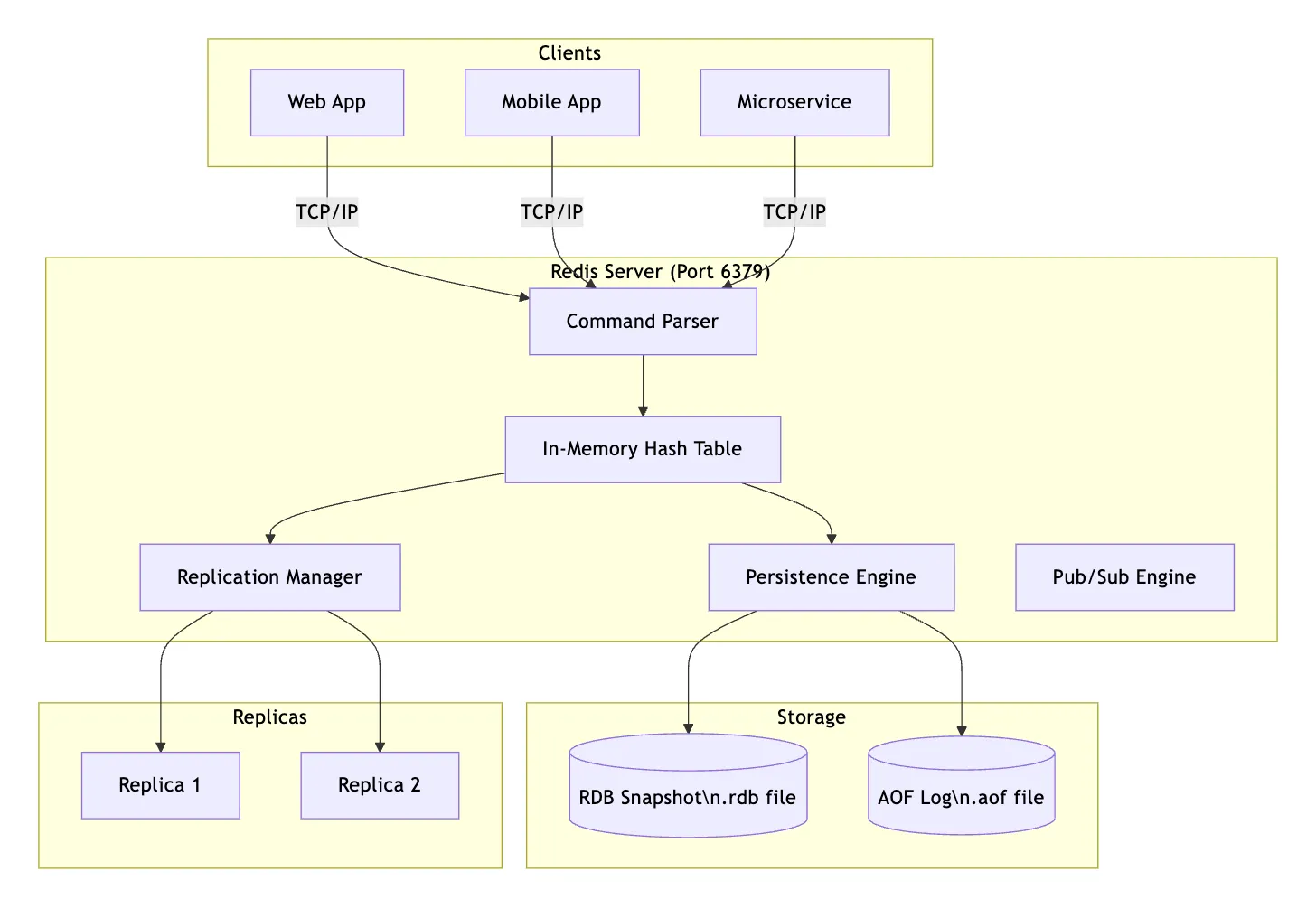
Redis has 3 main layers: Client, Redis Server, and Storage & Replicas.
- Clients (Who talks to Redis)
Three types of apps send requests to Redis:
- Web App
- Mobile App
- Microservice All three connect using TCP/IP on port 6379 — the default Redis port.
- Redis Server (The brain) Every incoming request first hits the Command Parser. Think of it as a receptionist — it reads the command (like GET key or SET key value) and figures out what to do with it.
Then the parsed command goes straight to the In-Memory Hash Table — this is where all the actual data lives, stored in RAM for lightning-fast access.
Three Engines (What happens after data is stored) From the Hash Table, data flows to three systems: EngineJobReplication ManagerCopies data to replica servers for backup/load balancingPersistence EngineSaves data to disk so it survives restartsPub/Sub EngineHandles real-time messaging between publishers and subscribers
Storage & Replicas (The bottom) Replicas (left side):
Replica 1 & Replica 2: exact copies of the main Redis data, kept in sync by the Replication Manager
Storage (right side): two ways Redis saves data to disk:
RDB Snapshot (.rdb file): periodic full snapshots, like a photo of the data at a point in time AOF Log (.aof file) — logs every write command, like a receipt history. More detailed but larger
The Key Idea
- Redis keeps everything in memory (RAM) for speed, but uses persistence + replication to make sure data isn’t lost if something crashes.
How Redis Stores Data Internally
Redis uses a hash table internally — the same data structure as dict in Python. This gives O(1) average time for GET and SET.
Real-World Example — Twitter/X: Twitter uses Redis to store each user’s timeline. When we open the app, it doesn’t run a complex SQL JOIN across 500 million tweets — it simply fetches a pre-built list stored in Redis under
timeline:user:1234. Sub-millisecond response time for 300M+ users.
# How Redis thinks of your data internally:
{
    "user:1001:name"    : "Alice",
    "user:1001:email"   : "alice@example.com",
    "product:42:stock"  : "150",
    "session:xyz789"    : '{"userId": 1001, "role": "admin"}',
    "counter:visits"    : "94827"
}
2.1.2 Advantages and Limitations
Advantages
| Advantage | Why It Matters | Example |
|---|---|---|
| Blazing Fast | In-memory = no disk I/O. O(1) operations | 1,000,000+ ops/sec on one machine |
| Simple Model | No schemas, no JOINs, no complex queries | Store session data without defining tables |
| Horizontally Scalable | Redis Cluster shards across nodes | Add nodes as user base grows |
| Flexible Types | 10+ data types beyond strings | Sorted Sets for leaderboards |
| Atomic Operations | INCR is atomic — thread-safe by design | Safe concurrent counters |
| TTL Support | Keys auto-expire (Time To Live) | Auto-expire sessions after 30 min |
| Pub/Sub Built-in | Event broadcasting natively | Real-time chat notifications |
Limitations
| Limitation | Explanation |
|---|---|
| Memory-Bound | ALL data lives in RAM. RAM is expensive. You can’t store 500GB in Redis. |
| No Complex Queries | No SQL JOIN, GROUP BY, complex WHERE. Design data around access patterns. |
| Limited ACID | MULTI/EXEC ≠ full SQL transactions. No rollback on runtime errors. |
| Key-Based Lookup | Scanning all keys is O(N) and dangerous in production. |
| Persistence Complexity | In-memory data risks loss without careful persistence config. |
Key Insight for Students: Redis is NOT a replacement for PostgreSQL or MySQL. It’s a complement. Use Redis as a cache, session store, queue, or leaderboard — alongside a persistent relational database.
2.1.3 Common Use Cases
| Use Case | How Redis Helps | Real Company |
|---|---|---|
| Session Management | Store login sessions with auto-expiry TTL | GitHub, GitLab |
| Caching | Cache DB query results, API responses | Twitter, Instagram, Pinterest |
| Rate Limiting | Count API calls per user per time window | Stripe API, GitHub API |
| Leaderboards | Sorted Sets rank users by score in real-time | Stack Overflow, Gaming apps |
| Real-time Analytics | Count events, unique visitors | YouTube view counts |
| Message Queues | Lists as FIFO queues for task processing | Celery (Python), Sidekiq (Ruby) |
| Pub/Sub | Event broadcasting between microservices | Slack notifications |
| Geolocation | Find nearby drivers, restaurants, stores | Uber, Zomato, Swiggy |
| Autocomplete | Prefix-based search suggestions | Search suggestion boxes |
| Distributed Locks | Prevent race conditions across servers | Payment processing |
Real-World Example — Amazon Shopping Cart: When we add an item to our Amazon cart, that data is stored in Redis as
cart:user:9876. It persists for our session and expires after 30 days of inactivity — faster than querying a database on every page load.
2.2 Redis Fundamentals
2.2.1 Redis Data Model
Prerequisite: A data model describes HOW data is organized and accessed. In Redis, the model is a flat key-value namespace with rich value types — no tables, no rows, no foreign keys.
Key Naming Conventions
Since all keys share the same namespace, structured naming is critical:
Pattern: object-type:id:attribute

Examples:
user:1001:profile          # User profile data
user:1001:sessions         # User's active sessions
product:sku:BTN500:details # Product details
order:ORD2024001:status    # Order status
cache:homepage:trending    # Cached content
ratelimit:user:1001:api    # Rate limiting counter
Tip: Use colons (
:) as separators consistently. This lets you useSCAN 0 MATCH user:*to find all user-related keys safely in production.
Key Rules
| Rule | Detail |
|---|---|
| Format | Binary-safe strings (use readable UTF-8 names) |
| Max Size | 512 MB (keep them short — they add to memory) |
| Case Sensitive | User:1001 ≠ user:1001 |
| TTL | Keys can auto-expire in seconds or milliseconds |
2.2.2 Redis Data Types
The Big Picture: This is what makes Redis special. Unlike simple KV stores, Redis supports multiple rich value types.
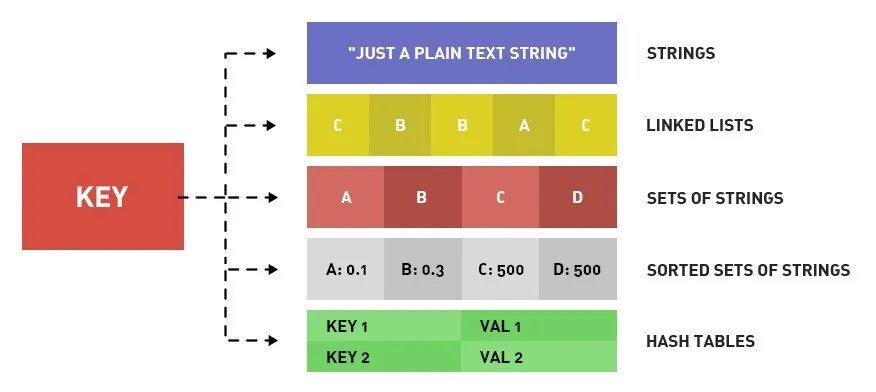
1. Strings
The most fundamental type. Binary-safe. Can hold text, numbers, serialized JSON, even images. Max: 512 MB.
SET username "Alice"
SET counter 0
SET user:1001:profile '{"name":"Alice","age":25}'   # Store JSON as string
SET flag 1

GET username                    # Returns "Alice"
GET counter                     # Returns "0"
INCR counter                    # counter → 1 (ATOMIC increment)
INCRBY counter 5                # counter → 6
DECR counter                    # counter → 5
INCRBYFLOAT price 1.5           # Float increment

# Key with expiry (TTL):
SETEX session:tok123 3600 "user:1001"   # Expires in 3600 seconds
TTL session:tok123              # Returns remaining seconds
PTTL session:tok123             # Returns remaining milliseconds
EXPIRE username 86400           # Set expiry on existing key
PERSIST username                # Remove expiry (make permanent)
Real-World Example — Rate Limiting (Twitter): Twitter limits 300 tweets per 3 hours. Implementation:
SET ratelimit:user:1001:tweets 0
INCR ratelimit:user:1001:tweets   # On each tweet
EXPIRE ratelimit:user:1001:tweets 10800   # 3 hours
# When value hits 300 → reject the request
2. Lists
An ordered list of strings, implemented as a doubly linked list. Supports push/pop from both ends — perfect for queues and stacks.
Left End (Head)                          Right End (Tail)
      ▼                                        ▼
LPUSH/LPOP  [resize_image] [send_email] [gen_pdf]  RPUSH/RPOP

← QUEUE  (LPUSH + RPOP) →
←← STACK (LPUSH + LPOP) →
LPUSH tasks "send_email" # Push to LEFT: ["send_email"]
LPUSH tasks "resize_image" # ["resize_image", "send_email"]
RPUSH tasks "generate_pdf" # ["resize_image", "send_email", "generate_pdf"]
LLEN tasks # Returns 3
LRANGE tasks 0 -1 # Get ALL elements (0=first, -1=last)
LRANGE tasks 0 1 # Get first 2 elements
LINDEX tasks 0 # Get element at index 0
LPOP tasks # Remove & return "resize_image" (from left)
RPOP tasks # Remove & return "generate_pdf" (from right)
# Blocking pop — WAITS for a new task (perfect for workers!)
BLPOP tasks 30 # Block up to 30 seconds waiting for a taskReal-World Example — Celery Task Queue (Instagram): When a user uploads a photo on Instagram, a job is pushed to a Redis list:
RPUSH jobs:image:resize "{photoId: 9876}". Background worker processes (usingBLPOP) pick up and process jobs — resizing images, sending notifications — without polling.
3. Sets
An unordered collection of unique strings. Duplicates are automatically ignored. Supports powerful math operations.
SADD followers:user:1001 "user:2001" "user:3001" "user:4001"
SADD following:user:2001 "user:1001" "user:5001"

SMEMBERS followers:user:1001              # Get all members
SISMEMBER followers:user:1001 "user:2001" # Returns 1 (is member)
SCARD followers:user:1001                 # Count = 3
SPOP followers:user:1001                  # Remove & return a random member

# ─── Set Math Operations ───
SADD tags:article:101 "redis" "nosql" "database"
SADD tags:article:102 "redis" "caching" "performance"

SINTER tags:article:101 tags:article:102  # Intersection → {"redis"}
SUNION tags:article:101 tags:article:102  # Union → all unique tags
SDIFF  tags:article:101 tags:article:102  # Difference → {"nosql","database"}
Real-World Example — LinkedIn “People You May Know”:
SINTER connections:alice connections:bob
# Returns users known by BOTH → potential connection suggestions
4. Hashes
A field-value map stored under a single key. Think: a mini-dictionary, or a single database row. Perfect for representing objects.
Hash vs String — Which to use for objects?
| Approach | Code | Problem |
|---|---|---|
| String | SET user:1001 '{"name":"Alice","age":28}' | To update age, must read → deserialize → update → serialize → write entire object |
| Hash | HSET user:1001 name "Alice" age 28 | Update just one field: HSET user:1001 age 29 — no touching other fields |
# Store a user object as a Hash
HSET user:1001 name "Alice Sharma" email "alice@example.com" age 28 city "Thimphu"

HGET user:1001 name             # Returns "Alice Sharma"
HGET user:1001 email            # Returns "alice@example.com"
HGETALL user:1001               # Returns ALL fields and values
HMGET user:1001 name email      # Get multiple specific fields
HKEYS user:1001                 # Returns field names: [name, email, age, city]
HVALS user:1001                 # Returns values only
HLEN user:1001                  # Returns 4 (number of fields)
HSET user:1001 name "Alice S."  # Update just one field
HDEL user:1001 city             # Delete one field
HEXISTS user:1001 email         # Does field exist? → 1
HINCRBY user:1001 age 1         # Atomically increment age field
Real-World Example — GitHub Repositories:
HSET repo:torvalds/linux stars 170000 forks 49000 language "C"When you open the repo page, GitHub fetches all fields with
HGETALLin microseconds — no SQL query.
5. Sorted Sets (ZSets)
The most powerful Redis type. Like a Set, but every member has a floating-point score. Members are always kept sorted by score. Time complexity: O(log N) for most operations.
# ─── Game Leaderboard ───
ZADD leaderboard 9500 "player:alice"
ZADD leaderboard 8200 "player:bob"
ZADD leaderboard 9800 "player:charlie"
ZADD leaderboard 7100 "player:diana"

# Get top 3 (highest scores first):
ZREVRANGE leaderboard 0 2 WITHSCORES
# → charlie 9800 | alice 9500 | bob 8200

# Get rank (0-indexed, best = rank 0):
ZREVRANK leaderboard "player:alice"         # → 1 (2nd place)
ZSCORE leaderboard "player:alice"           # → 9500.0

# Add points:
ZINCRBY leaderboard 500 "player:alice"      # alice → 10000

# Range by score:
ZRANGEBYSCORE leaderboard 8000 10000 WITHSCORES  # All between 8000-10000
ZCOUNT leaderboard 8000 +inf                # Count with score >= 8000

# Remove lowest scorer:
ZPOPMIN leaderboard                         # Removes & returns diana (lowest score)
LEADERBOARD (sorted by score, desc):
┌────────────────────────────┐
│ 🥇 charlie │ 9800 │
│ 🥈 alice │ 9500 │
│ 🥉 bob │ 8200 │
│ diana │ 7100 │
└────────────────────────────┘
ZREVRANGE leaderboard 0 -1 WITHSCORESReal-World Example — Stack Overflow:
ZREVRANGE reputations 0 99 WITHSCORES— fetches the top 100 users for the “Top Users” page in real-time. No complex SQL, no sorting at query time.
2.2.3 Basic Redis Commands and Operations
Global Key Commands (work on ALL types)
EXISTS user:1001          # Does key exist? → 1 or 0
DEL user:1001             # Delete key
TYPE user:1001            # Returns: string | list | set | hash | zset
RENAME user:1001 user:old:1001
EXPIRE user:1001 3600     # Set TTL (seconds from now)
EXPIREAT user:1001 1735689600  # TTL = Unix timestamp
PEXPIRE user:1001 60000   # TTL in milliseconds
TTL user:1001             # Remaining TTL in seconds (-1 = no TTL, -2 = key gone)
PERSIST user:1001         # Remove TTL

# ─── Searching Keys ───
KEYS user:*               # DANGEROUS in production!
SCAN 0 MATCH user:* COUNT 100  # Safe cursor-based iteration
WARNING — Never
KEYS *in Production!KEYSis O(N) and blocks ALL other operations while scanning. UseSCANinstead — it iterates in small batches without blocking. This is a common mistake that can bring down production Redis.
Server Commands
PING               # Test connection → PONG
INFO               # Full server stats
INFO memory        # Memory-specific stats
INFO replication   # Replication status
DBSIZE             # Count total keys
CONFIG GET maxmemory       # Read config value
CONFIG SET maxmemory 2gb   # Update config live (no restart!)
SLOWLOG GET 10             # Last 10 slow commands
FLUSHDB                    # Delete ALL keys in current DB
FLUSHALL                   # Delete ALL keys in ALL DBs
2.3 Redis Data Structures and Algorithms
Beyond basic types, Redis provides specialized structures for specific problems. All are extremely memory-efficient.
2.3.1 Bitmaps and Bitfields
Prerequisite: 1 byte = 8 bits. A bit = 0 or 1. Bitmaps treat a Redis String as an array of bits — enabling space-efficient boolean operations at massive scale.
Bitmaps
# ─── Daily User Login Tracking ───
# Bit position = User ID
SETBIT logins:2024-01-15 1001 1     # User 1001 logged in today
SETBIT logins:2024-01-15 2005 1     # User 2005 also logged in
SETBIT logins:2024-01-15 3099 1

GETBIT logins:2024-01-15 1001       # → 1 (logged in)
GETBIT logins:2024-01-15 9999       # → 0 (did NOT log in)
BITCOUNT logins:2024-01-15          # Total logins today

# Who was active on BOTH Jan 15 and Jan 16?
BITOP AND active_both logins:2024-01-15 logins:2024-01-16
BITCOUNT active_both                # Users active on both days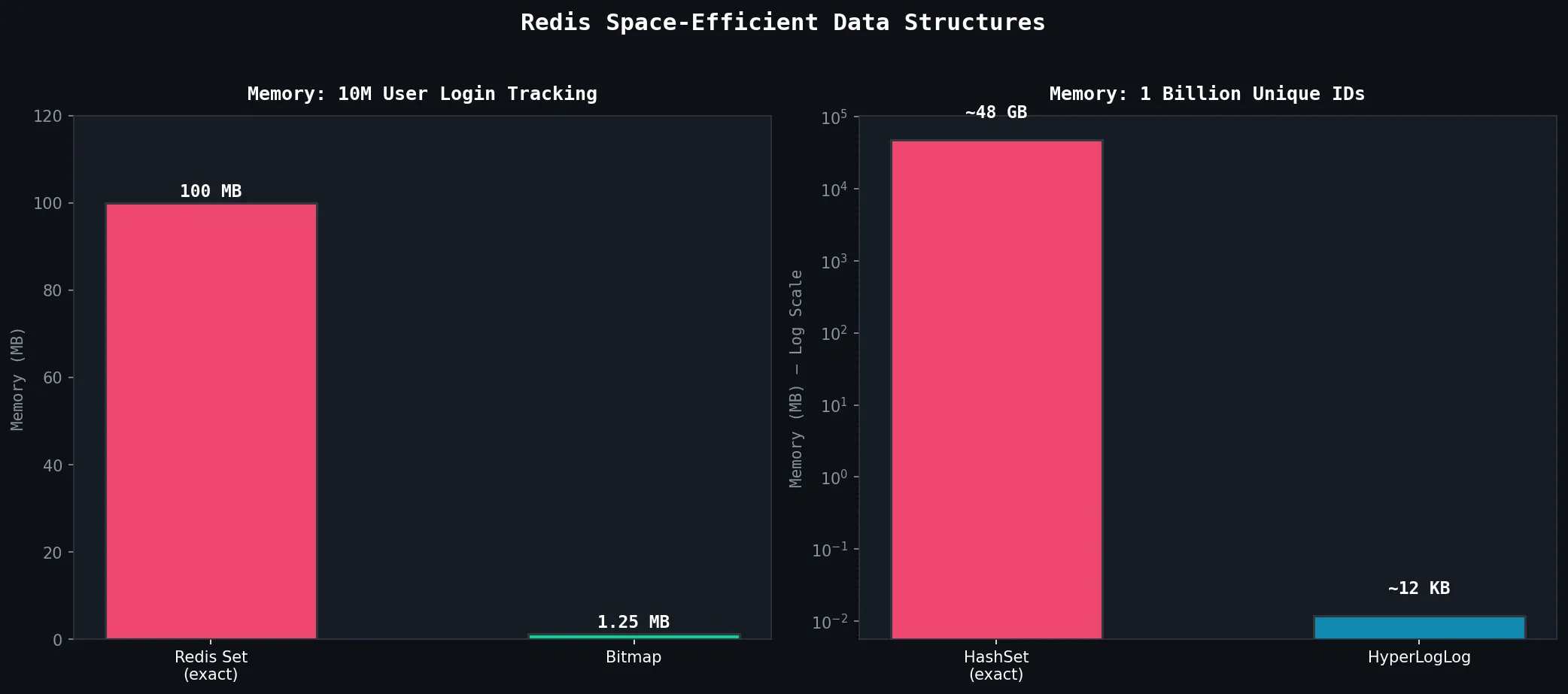
Why Bitmaps are a Game-Changer:
| Method | Memory for 10M users | Approach |
|---|---|---|
| Redis Set (exact) | ~100 MB | Store each user ID as string |
| Bitmap | ~1.25 MB | 1 bit per user |
| Savings | 80x smaller |
Bitfields
Store integers of custom bit-widths in a compact binary format:
# Compact game player stats:
# Offset 0:  level (u8,  0-255)
# Offset 8:  health (u8, 0-255)
# Offset 16: gold (u16, 0-65535)

BITFIELD player:1001 SET u8  0  15    # Level  = 15
BITFIELD player:1001 SET u8  8  87    # Health = 87
BITFIELD player:1001 SET u16 16 5000  # Gold   = 5000

BITFIELD player:1001 GET u8 0         # → 15
BITFIELD player:1001 INCRBY u8 0 1    # Level up! → 16

# Overflow protection: SAT = saturate at max (no wrap-around)
BITFIELD player:1001 OVERFLOW SAT INCRBY u8 8 200  # Health stays at 255
Real-World Example — GitHub Contribution Graph: Those green squares on GitHub profiles? Each bit represents one day.
BITCOUNT contributions:user:torvalds= total active days. Storing 365 days of activity for 100M users = ~4.5 GB with bitmaps (vs ~365 GB with a Set per user).
2.3.2 HyperLogLog for Cardinality Estimation
Prerequisite: Cardinality = count of UNIQUE elements. Counting exact unique visitors requires storing every visitor ID → O(N) memory. HyperLogLog (HLL) estimates this using fixed memory (~12 KB), regardless of how many items we’ve seen.
The Magic Numbers:
HyperLogLog:
  Memory:   Always ~12 KB (even for 1 BILLION unique items!)
  Accuracy: ~99.19% (0.81% standard error)
Trade-off: Approximate, not exact| Approach | Memory (1B unique IDs) | Accuracy |
|---|---|---|
| HashSet (exact) | ~48 GB | 100% exact |
| Redis Set (exact) | ~48 GB | 100% exact |
| HyperLogLog | ~12 KB | ~99.2% |
# ─── Count Unique Visitors to a Webpage ───
PFADD pageviews:homepage "192.168.1.1"    # Visitor 1
PFADD pageviews:homepage "10.0.0.25"      # Visitor 2
PFADD pageviews:homepage "192.168.1.1"    # Visitor 1 AGAIN → ignored!
PFADD pageviews:homepage "172.16.5.99"    # Visitor 3

PFCOUNT pageviews:homepage                # → ~3 (estimated unique)

# ─── Merge multiple HLLs ───
PFADD pageviews:about    "user_a" "user_b" "user_c"
PFADD pageviews:products "user_b" "user_d" "user_e"

PFMERGE pageviews:combined pageviews:about pageviews:products
PFCOUNT pageviews:combined    # → ~5 (a, b, c, d, e — de-duplicated)
Real-World Example — YouTube: Tracking “500 million unique views” exactly would require enormous memory. YouTube uses HLL-like structures. The view count is an approximation — and at that scale, nobody notices or cares about ±0.81% error.
2.3.3 Bloom Filters for Membership Testing
Prerequisite: A Bloom Filter answers: “Have I seen this item before?”
- Returns “DEFINITELY NOT” → 100% correct (no false negatives)
- Returns “PROBABLY YES” → might be wrong (false positives possible)
# Create Bloom Filter: 10M URLs capacity, 0.1% false positive rate
BF.RESERVE crawled_urls 0.001 10000000

BF.ADD crawled_urls "https://example.com/page1"
BF.ADD crawled_urls "https://google.com"
BF.ADD crawled_urls "https://reddit.com/r/programming"

BF.EXISTS crawled_urls "https://example.com/page1"   # → 1 (probably seen)
BF.EXISTS crawled_urls "https://newsite.xyz/unknown"  # → 0 (DEFINITELY NOT seen)

# Bulk operations:
BF.MADD   crawled_urls "https://a.com" "https://b.com" "https://c.com"
BF.MEXISTS crawled_urls "https://a.com" "https://nope.com"   # → [1, 0]
Real-World Example — Medium.com: Medium uses Bloom Filters to track which articles a user has already read — so they don’t show the same article twice in the feed. Storing “read” status for 100M articles × 100M users with a HashSet = petabytes. With Bloom Filters = feasible.
2.3.4 Geospatial Indexes
Stores latitude/longitude coordinates and enables proximity queries. Internally uses Sorted Sets with Geohash-encoded scores.
# ─── Ride-Hailing App: Track Drivers ───
GEOADD drivers 89.6419 27.4712 "driver:D001"   # Thimphu, Bhutan
GEOADD drivers 91.1006 26.1445 "driver:D002"   # Guwahati, India
GEOADD drivers 88.3639 22.5726 "driver:D003"   # Kolkata, India

# Get a driver's position:
GEOPOS drivers "driver:D001"
# → [89.64190..., 27.47120...]

# Distance between two drivers:
GEODIST drivers "driver:D001" "driver:D002" km
# → ~400 km

# ─── Find nearest 5 drivers within 50km of customer ───
GEOSEARCH drivers
  FROMLONLAT 89.6419 27.4712   # Customer's location
  BYRADIUS 50 km
  ASC                          # Sort nearest first
  COUNT 5
WITHCOORD WITHDIST # Include distance and coords| Command | Description |
|---|---|
GEOADD key lon lat member | Add a location |
GEOPOS key member | Get coordinates |
GEODIST key m1 m2 unit | Distance (m, km, mi, ft) |
GEOSEARCH key FROMLONLAT ... | Radius/bounding box search (Redis 6.2+) |
GEOHASH key member | Get Geohash string encoding |
Real-World Example — Swiggy / Zomato: When you open the app, it runs:
GEOSEARCH restaurants FROMLONLAT <your_lat> <your_lon> BYRADIUS 5 km ASCReturns all restaurants within 5km, sorted by proximity, in sub-millisecond time.
2.4 Redis Persistence and Durability
Prerequisite: Redis is in-memory. A crash or restart clears all data — like RAM being wiped on shutdown. Persistence mechanisms save data to disk for recovery.
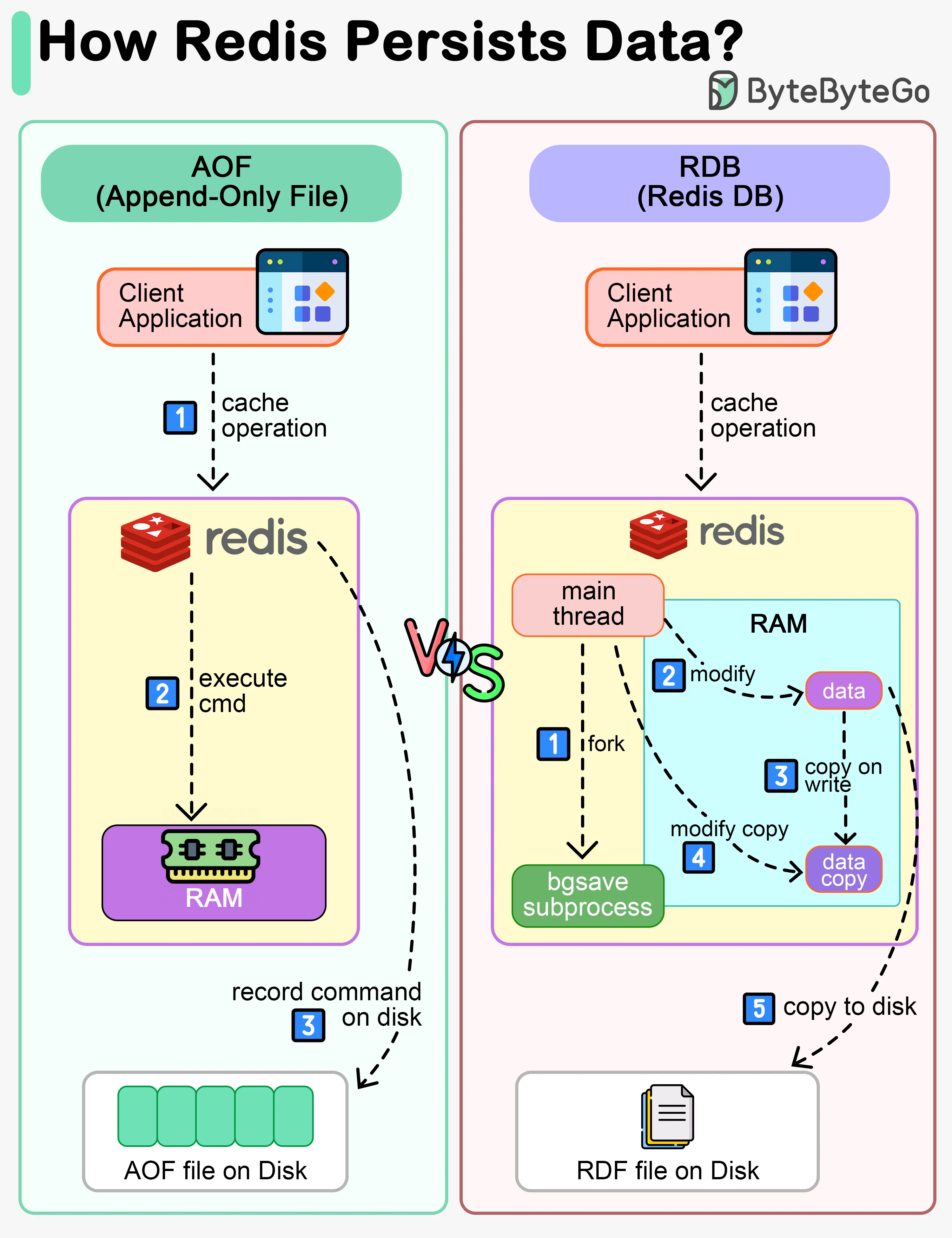
                    Persistence Options
                          │
          ┌───────────────┴───────────────┐
     No Persistence                    Add RDB
     Pure cache                           │
     Data lost on restart         ┌───────┴───────┐
                               RDB Only        Add AOF
                           Point-in-time      RDB + AOF
                            snapshots      ← RECOMMENDED
                           Fast restart,    Best of both
                            some loss
                                        AOF Only
                                     Log every write
                                    Min data loss,
                                    slower restart
2.4.1 RDB Snapshots (Redis Database Backup)
Creates binary point-in-time snapshots at configured intervals. Uses OS fork + Copy-On-Write to snapshot without blocking.
| Feature | Detail |
|---|---|
| File format | Compact binary .rdb (highly compressible) |
| Performance impact | Low — fork is nearly instant |
| Recovery time | Fast — loads single binary file |
| Data loss risk | Up to X minutes (last save interval) |
| Best for | Backups, disaster recovery, warm cache restarts |
# redis.conf:
save 900 1      # Snapshot if ≥1 key changed in 15 min
save 300 10     # Snapshot if ≥10 keys changed in 5 min
save 60 10000   # Snapshot if ≥10000 keys changed in 1 min

dbfilename dump.rdb
dir /var/lib/redis/

# Manual snapshot commands:
BGSAVE           # Background save (non-blocking )
SAVE             # Synchronous save (BLOCKS Redis — use carefully)
LASTSAVE         # Unix timestamp of last successful save
2.4.2 AOF (Append-Only File) Logs
Logs every write operation to a file. On restart, Redis replays all commands to rebuild the dataset. Like a transaction log in RDBMS.
# redis.conf:
appendonly yes
appendfilename "appendonly.aof"

# Fsync policy (when to sync buffer to disk):
appendfsync always    # Every write → MOST DURABLE, ~1000 writes/sec
appendfsync everysec  # Every second → BALANCED (recommended )
appendfsync no        # Let OS decide → FASTEST, least durable

# Auto-rewrite (compress AOF when it gets too large):
auto-aof-rewrite-percentage 100   # Rewrite when size doubles
auto-aof-rewrite-min-size 64mb    # But only if ≥64MB

# Trigger manually:
BGREWRITEAOF
What the AOF file looks like (human-readable RESP format):
*3           ← Command has 3 arguments
$3           ← Next arg: 3 bytes
SET          ← Command
$8           ← Next arg: 8 bytes
username     ← Key
$5           ← Next arg: 5 bytes
Alice        ← Value
2.4.3 Hybrid Persistence Strategies
| Strategy | Data Loss Risk | Restart Speed | Use Case |
|---|---|---|---|
| No persistence | Total loss | Instant | Pure cache, data rebuildable |
| RDB only | Up to minutes | Fast | Tolerable loss, backups |
| AOF only | ≤1 second | Slower | High-durability requirement |
| RDB + AOF | ≤1 second | Fast (uses RDB) | Production recommended |
# redis.conf — Production Hybrid Setup:
appendonly yes
appendfsync everysec
auto-aof-rewrite-percentage 100
auto-aof-rewrite-min-size 64mb

save 900 1
save 300 10
save 60 10000

# Redis 7.0+ RDB-AOF Hybrid (AOF starts with embedded RDB snapshot):
aof-use-rdb-preamble yes    # Faster rewrites + fast restart
Real-World Example — Shopify on Black Friday: Shopify runs Redis in hybrid mode. AOF
everysecensures cart and session data loses at most 1 second during outages. Daily RDB snapshots are sent to AWS S3 for disaster recovery. During peak traffic (millions of transactions/minute), this balance is critical.
2.5 Redis Clustering and High Availability
Prerequisite:
- Single Point of Failure (SPOF): If one server fails, the whole service goes down.
- High Availability (HA): System keeps working even if some nodes fail.
- Horizontal Scaling: Adding more machines (not bigger machines).
2.5.1 Redis Sentinel for Automatic Failover
Sentinel monitors Redis servers and automatically promotes a replica to primary if the primary fails.
         Normal Operation
         ─────────────────
Primary (Writes + Reads)
    ↓ async replication
Replica 1 ←──────────────── Sentinel 1
Replica 2 ←──────────────── Sentinel 2
                             Sentinel 3

         Failover Process
         ─────────────────
1. Primary stops responding
2. Sentinels detect it
3. Quorum reached (2/3 agree → "Primary looks down!")
4. SLAVEOF NO ONE (Replica 1 promoted!)
5. App notified: new primary = Replica 1
6. App reconnects to new primary
# sentinel.conf:
sentinel monitor mymaster 192.168.1.100 6379 2
# Name: mymaster | Address | Quorum: 2 sentinels must agree
sentinel down-after-milliseconds mymaster 5000 # Down after 5s
sentinel failover-timeout mymaster 60000 # Failover must finish in 60s
sentinel parallel-syncs mymaster 1 # Replicas syncing simultaneously
# Start:
redis-sentinel /etc/redis/sentinel.confSentinel vs Cluster: Sentinel solves High Availability (auto-failover) but NOT horizontal scaling. To scale writes beyond one machine, use Redis Cluster.
2.5.2 Redis Cluster for Horizontal Scaling
Redis Cluster automatically shards data across multiple nodes using hash slots.
Hash Slot Sharding
              16,384 Hash Slots
                     │
    ┌────────────────┼────────────────┐
    ▼                ▼                ▼
🖥 Node A        🖥 Node B        🖥 Node C
Slots 0–5460   Slots 5461–10922  Slots 10923–16383

key: 'user:1001'    → CRC16 % 16384 = 7638  → Node B
key: 'session:abc'  → CRC16 % 16384 = 2891  → Node A
key: 'product:55'   → CRC16 % 16384 = 12001 → Node C
# Hash slot formula:
slot = CRC16(key) % 16384
# ─── Force keys to same slot (Hash Tags) ───
{user:1001}.name # Both hashed on "user:1001" → same slot
{user:1001}.email # → same node → multi-key ops work!
# redis.conf for each cluster node:
cluster-enabled yes
cluster-config-file nodes.conf
cluster-node-timeout 5000
# Create cluster (3 masters + 3 replicas):
redis-cli --cluster create \
192.168.1.101:6379 192.168.1.102:6379 192.168.1.103:6379 \
192.168.1.104:6379 192.168.1.105:6379 192.168.1.106:6379 \
--cluster-replicas 1
redis-cli -c cluster info # Status
redis-cli -c cluster nodes # Node detailsSentinel vs Cluster Comparison
| Feature | Redis Sentinel | Redis Cluster |
|---|---|---|
| Primary purpose | HA (auto-failover) | Scaling + HA |
| Max data | One machine’s RAM | Sum of all nodes’ RAM |
| Write throughput | Single machine | Scales with nodes |
| Multi-key ops | Full support | Keys must share slot |
| Minimum nodes | 3 (1P + 2 Sentinels) | 6 (3M + 3R) |
| Complexity | Moderate | Higher |
Real-World Example — Instagram: Instagram uses Redis Cluster across thousands of nodes to store follower/following relationships and feed data for 1+ billion users. No single machine could hold all this in RAM.
2.5.3 Replication and Data Synchronization
# On replica node's redis.conf:
replicaof 192.168.1.100 6379     # Point to primary

# Or dynamically:
REPLICAOF 192.168.1.100 6379
REPLICAOF NO ONE                  # Detach (promote to standalone)

# Check replication status on primary:
INFO replication
# → role:master
# → connected_slaves:2
# → slave0:ip=192.168.1.101,port=6379,state=online,offset=...,lag=0
Full Sync Process:
Replica → PSYNC ? -1 (full sync request) → Primary
Primary → BGSAVE (fork + create RDB)
Primary → Send RDB file → Replica
Replica → Load RDB (clear memory first)
Primary → Send buffered commands (accumulated during RDB transfer)
Primary → Stream every write command (ongoing replication)
2.6 Redis Modules and Extensions
Redis Modules (since Redis 4.0) extend Redis with new data types and commands. Redis Stack bundles the most popular ones together.
                    Redis Stack
                        │
         ┌──────────────┼──────────────┐
         │              │              │
    RediSearch      RedisJSON    RedisTimeSeries
  Full-Text Search  Native JSON    Time-Series
  + Aggregations  Storage+Query  Data+Analytics
         │              │              │
    RedisAI         RedisBloom    Redis Core
  ML Model Serving  Bloom+Cuckoo
                   Filters+HLL
2.6.1 RediSearch — Full-Text Search
A. The Index Creation: FT.CREATE
FT.CREATE idx:products
  ON HASH
  PREFIX 1 product:
  SCHEMA
    name        TEXT WEIGHT 5.0   # Higher weight = more relevant in search
    description TEXT
    price       NUMERIC SORTABLE
    category    TAG
    brand       TAG SORTABLE
Command Breakdown:
idx:products— Identifier for the search indexON HASH— Tracks Redis Hashes (field-value pairs)PREFIX 1 product:— Only indexes keys starting withproduct:SCHEMA— Declares which fields are searchable
Field Types:
| Field Type | Description | Use Case |
|---|---|---|
TEXT | Full-text search with tokenization and stemming | Names and Descriptions |
TAG | Atomic literal, memory-efficient, no word splitting | Categories, Brands, IDs |
NUMERIC | Range-based math queries (x > 100) | Prices, timestamps, quantities |
Special Modifiers:
WEIGHT <value>— Assigns importance (e.g.,5.0on name ranks name matches higher)SORTABLE— Keeps metadata in memory forSORTBYclauses
B. Data Ingestion: HSET
HSET product:1001 name "iPhone 15 Pro" description "Apple flagship" price 1299 category "smartphone" brand "Apple"
HSET product:1002 name "Samsung Galaxy S24" description "Android flagship" price 999 category "smartphone" brand "Samsung"
HSET product:1003 name "Sony WH-1000XM5" description "Noise cancelling" price 350 category "headphones" brand "Sony"
The engine automatically detects when a new key matching
product:is created and adds it to the index in the background.
C. Querying: FT.SEARCH
FT.SEARCH idx:products "iPhone"                          # Full-text search
FT.SEARCH idx:products "@category:{smartphone}"          # Tag filter
FT.SEARCH idx:products "@price:[200 500]"                # Numeric range
FT.SEARCH idx:products "flagship @price:[1000 +inf]"     # Combined
FT.SEARCH idx:products "*" SORTBY price ASC              # Sort by price
FT.SEARCH idx:products "iPhone" LIMIT 0 10               # Pagination

# ─── Aggregations ───
FT.AGGREGATE idx:products "*"
  GROUPBY 1 @category
  REDUCE COUNT 0 AS product_count
Query Pattern Reference:
@category:{smartphone}—@field+{}for TAG fields@price:[200 500]— Inclusive numeric range+inf— Represents infinity in numeric rangesLIMIT 0 10— Like SQLOFFSET 0 LIMIT 10
D. Key Takeaways
- Decoupling — Index is separate from data. Deleting the index leaves Hash data intact.
- Performance — Uses Inverted Index → O(1) or O(log N) vs O(N) for full scans.
- Real-time — Index updates immediately on
HSETorDELon matching prefix.
Real-World Example — E-Commerce Search: When you search “iPhone 15 case black” on an e-commerce site, RediSearch returns ranked results in under 10ms, combining full-text matching with faceted filtering (brand, price range, category).
2.6.2 RedisJSON — Native JSON Storage
RedisJSON vs String JSON:
| Operation | Store as String | RedisJSON |
|---|---|---|
| Partial update | Read → parse → update → write | JSON.SET $.field value |
| Partial read | Get entire blob | JSON.GET $.field |
| Array push | Full rewrite | JSON.ARRAPPEND |
| Search | Not indexable | Index with RediSearch |
# ─── Store a JSON document ───
JSON.SET user:1001 $ '{
  "name": "Alice Sharma",
  "age": 28,
  "address": {"city": "Thimphu", "country": "Bhutan"},
  "skills": ["Python", "Redis", "Docker"]
}'

# ─── Read (JSONPath syntax) ───
JSON.GET user:1001 $               # Entire document
JSON.GET user:1001 $.name          # → "Alice Sharma"
JSON.GET user:1001 $.address.city  # → "Thimphu"
JSON.GET user:1001 $.skills        # → ["Python", "Redis", "Docker"]

# ─── Partial Updates (NO need to read whole doc!) ───
JSON.SET user:1001 $.age 29
JSON.SET user:1001 $.address.city "Paro"

# ─── Array Operations ───
JSON.ARRAPPEND user:1001 $.skills '"Kubernetes"'
JSON.ARRLEN    user:1001 $.skills      # → 4
JSON.ARRINDEX  user:1001 $.skills '"Redis"'   # → 1

# ─── Numeric Operations ───
JSON.NUMINCRBY user:1001 $.age 1      # age → 30
2.6.3 RedisTimeSeries — Time-Series Data
# ─── Create a time series ───
TS.CREATE temperature:sensor:001
  RETENTION 86400000          # Keep 24 hours (milliseconds)
  LABELS location Thimphu unit celsius

# ─── Add data points ───
TS.ADD temperature:sensor:001 * 22.5    # * = auto current timestamp
TS.ADD temperature:sensor:001 * 23.1
TS.ADD temperature:sensor:001 * 21.8

# ─── Bulk add across multiple series ───
TS.MADD
  temperature:sensor:001 * 23.5
  humidity:sensor:001    * 68.2
  pressure:sensor:001    * 1013.1

# ─── Query ───
TS.RANGE temperature:sensor:001 - +    # All data
TS.RANGE temperature:sensor:001 - + AGGREGATION avg 3600000   # Hourly avg

# ─── Automatic Downsampling Rule ───
TS.CREATERULE temperature:sensor:001 temp:hourly:001
  AGGREGATION avg 3600000     # Auto-compute hourly averages
Real-World Example — Tesla Telemetry: Every Tesla sends battery level, temperature, speed, and GPS every second. RedisTimeSeries stores this with automatic aggregation (per-minute averages), enabling dashboards and anomaly detection in real-time.
2.6.4 RedisAI — ML Model Serving
# ─── Load a trained TensorFlow model ───
AI.MODELSTORE sentiment:model TF CPU
  INPUTS input_text
  OUTPUTS prediction
  BLOB <model_binary_data>

# ─── Set input tensor ───
AI.TENSORSET input:review FLOAT 1 128 VALUES 0.1 0.5 0.3 ...

# ─── Run inference ───
AI.MODELEXECUTE sentiment:model
  INPUTS 1 input:review
  OUTPUTS 1 output:sentiment

# ─── Get result ───
AI.TENSORGET output:sentiment VALUES
# → [0.92]  (92% positive sentiment)
User Data → RedisAI ML Inference → Prediction Result
(in Redis) (Everything in one hop — no external ML server!)Real-World Example: E-commerce platforms use RedisAI for real-time product recommendations. The user’s browsing history (stored in Redis) is fed directly into an ML model inside Redis — returning recommendations in microseconds.
2.7 Redis Performance Optimization
2.7.1 Pipelining and Transactions
Prerequisite: Every Redis command involves a round-trip: Client → Network → Redis → Network → Client. For 1000 commands, that’s 1000 round-trips. Network latency dominates performance.
Pipelining
WITHOUT Pipelining (100 round-trips):
  SET key:1 → OK
  SET key:2 → OK
  ... (100 times)

WITH Pipelining (1 round-trip):
  SET key:1 | SET key:2 | ... (100 commands) → OK OK OK ...
# Python example (redis-py library):
# Without pipelining — 10,000 round-trips
import redis
r = redis.Redis()
for i in range(10000):
r.set(f"key:{i}", f"value:{i}") # Slow!
# With pipelining — ~1 round-trip
pipe = r.pipeline()
for i in range(10000):
pipe.set(f"key:{i}", f"value:{i}") # Just queues commands
results = pipe.execute() # Send all at once!
# ~100x faster! 🚀Transactions (MULTI/EXEC)
Redis ≠ SQL Transactions. Redis does NOT roll back on runtime errors. If command 3 of 5 fails, commands 1, 2, 4, 5 still execute.
MULTI/EXEConly guarantees no interleaving, not rollback.
# ─── Transfer credits atomically ───
MULTI                             # Start transaction (queue mode)
DECRBY user:1001:credits 100      # Queued
INCRBY user:2001:credits 100      # Queued
EXEC                              # Execute ALL atomically
DISCARD                           # Cancel transaction

# ─── Optimistic Locking with WATCH ───
WATCH user:1001:credits           # Monitor for changes
credits = GET user:1001:credits
MULTI
DECRBY user:1001:credits 100
EXEC    # Returns nil if credits changed since WATCH → retry!
Lua Scripts (Atomic Complex Operations)
# Atomic check-then-deduct:
EVAL "
  local balance = redis.call('GET', KEYS[1])
  if tonumber(balance) >= tonumber(ARGV[1]) then
    redis.call('DECRBY', KEYS[1], ARGV[1])
    return 1   -- success
  else
    return 0   -- insufficient funds
  end
" 1 user:1001:credits 100

# Pre-load script (use SHA hash to avoid re-sending):
SCRIPT LOAD "return redis.call('GET', KEYS[1])"   # → returns SHA1
EVALSHA <sha1_hash> 1 somekey
2.7.2 Memory Management and Eviction Policies
# redis.conf:
maxmemory 4gb
maxmemory-policy allkeys-lru    # What to do when memory is full
Eviction Policies
| Policy | Behavior | Best For |
|---|---|---|
noeviction | Error when full | Data that must NEVER be lost |
allkeys-lru | Evict LRU from all keys | General cache |
volatile-lru | Evict LRU from TTL keys only | Mixed permanent + cached |
allkeys-lfu | Evict least frequently used | Frequency > recency |
volatile-lfu | LFU from TTL keys only | Frequently accessed cache |
volatile-ttl | Evict soonest-expiring | Data with varying importance |
allkeys-random | Random eviction | Rarely used |
Memory Optimization Tips
# Check memory usage of a key:
MEMORY USAGE user:1001          # Returns bytes

# Check internal encoding:
OBJECT ENCODING user:1001       # ziplist / listpack / hashtable / etc.

# Memory analysis:
INFO memory
# Key fields to watch:
# used_memory_human      → current allocated
# mem_fragmentation_ratio → >1.5 = high fragmentation (consider restart)
# maxmemory_human        → configured limit

MEMORY DOCTOR               # Auto-diagnosis and suggestions
💡 Pro Tip — Hash for Small Objects: Redis uses a compact
listpackencoding for hashes with fewer than 128 fields and values under 64 bytes. Storing 1M user objects as hashes can be 10x more memory-efficient than using separate string keys.
2.7.3 Benchmarking and Monitoring Tools
# Built-in benchmark:
redis-benchmark -h localhost -p 6379 -n 100000 -c 50
# -n: total requests   -c: concurrent clients

redis-benchmark -t get,set -n 1000000 -q   # Quiet mode, GET+SET only

# Typical output on modern hardware:
# SET:   185,185 requests/sec
# GET:   192,307 requests/sec
# LPUSH: 178,571 requests/sec
INFO stats # hits, misses, ops/sec, rejected connections
INFO clients # connected_clients, blocked_clients
SLOWLOG GET 25 # Last 25 commands over slowlog threshold
SLOWLOG LEN # Total slow log entries
LATENCY HISTORY # Latency spikes over time
CLIENT LIST # All connected clients + stats
MONITOR # Real-time command stream (dev/debug only! )Key Metrics to Monitor
| Metric | Healthy Value | Alert If |
|---|---|---|
keyspace_hits / total | > 90% hit rate | Hit rate < 80% |
used_memory | < 80% of maxmemory | > 90% of maxmemory |
connected_clients | Stable | Sudden spike |
blocked_clients | 0 or very low | Growing |
mem_fragmentation_ratio | 1.0–1.5 | > 1.5 |
rdb_last_bgsave_status | ok | Not “ok” |
2.8 Redis Security Considerations
Critical Context: Redis was originally designed for trusted internal networks. By default — NO authentication, listens on all network interfaces! In 2016, tens of thousands of unprotected Redis instances were compromised. Security is not optional.
2.8.1 Authentication and Access Control
Legacy Password (Redis < 6.0)
# redis.conf:
requirepass YourStr0ngP@ssw0rd!

# Connect:
redis-cli -h localhost -p 6379 -a YourStr0ngP@ssw0rd!

# Or after connecting:
AUTH YourStr0ngP@ssw0rd!
ACL — Access Control Lists (Redis 6.0+) Modern Approach
# ─── Create users with specific permissions ───
ACL SETUSER alice on >alice_pass ~user:* +GET +HGET +HGETALL
# alice: enabled | password | key pattern | allowed commands

ACL SETUSER bob on >bob_pass ~order:* +@read
# bob: can read any key matching order:*

ACL SETUSER api_service on >svc_pass ~cache:* +GET +MGET +LRANGE +SETEX
# Microservice: read-only access to cache keys

ACL SETUSER admin on >admin_pass ~* +@all
# Full access admin

# ─── Disable default (unauthenticated) user ───
ACL SETUSER default off

# ─── Inspect ACLs ───
ACL LIST              # Show all rules
ACL WHOAMI            # Who am I currently?
ACL CAT               # All command categories
ACL CAT string        # All string commands
ACL LOG               # Security events (failed auths, denied commands)
ACL Command Categories
| Category | Commands Included |
|---|---|
+@read | GET, LRANGE, HGETALL, SMEMBERS, ZRANGE… |
+@write | SET, LPUSH, HSET, SADD, ZADD… |
+@string | String type commands only |
+@hash | Hash type commands only |
+@admin | CONFIG, INFO, MONITOR, DEBUG… (Give sparingly) |
~user:* | Key pattern: only keys starting with user: |
~* | All keys |
2.8.2 SSL/TLS Encryption
# Generate test certificates:
openssl genrsa -out redis.key 2048
openssl req -new -x509 -days 365 -key redis.key -out redis.crt -subj "/CN=redis"
# redis.conf (Redis 6.0+):
port 0 # Disable plain TCP
tls-port 6380 # Enable TLS
tls-cert-file /etc/redis/redis.crt
tls-key-file /etc/redis/redis.key
tls-ca-cert-file /etc/redis/ca.crt
tls-auth-clients yes # Require client cert
tls-protocols "TLSv1.2 TLSv1.3"
tls-prefer-server-ciphers yes
# Connect with TLS:
redis-cli -h localhost -p 6380 \
--tls \
--cert /path/to/client.crt \
--key /path/to/client.key \
--cacert /path/to/ca.crt2.8.3 Redis Security Best Practices
# 1. Bind to specific interfaces only:
bind 127.0.0.1 10.0.0.50    # NEVER: bind 0.0.0.0

# 2. Enable protected mode (default on, keep it on):
protected-mode yes

# 3. Disable or rename dangerous commands:
rename-command FLUSHDB  ""              # Disable completely
rename-command FLUSHALL ""
rename-command DEBUG    ""
rename-command CONFIG   "ADMIN_CFG_9k2m"   # Rename to secret
rename-command KEYS     ""              # Use SCAN instead

# 4. Run Redis as non-root:
# Create a dedicated 'redis' Linux user — never run as root!

# 5. Set maxmemory to prevent OOM:
maxmemory 4gb
maxmemory-policy allkeys-lru
The Redis Security Checklist
| Layer | Tool | Protects Against |
|---|---|---|
| Network | Firewall, bind to internal IP | Unauthorized external access |
| Authentication | ACL + strong passwords | Unauthorized users |
| Authorization | ACL key patterns + commands | Lateral movement |
| Encryption (transit) | TLS/SSL | Eavesdropping, MITM |
| Encryption (at rest) | App-level encryption | Disk/backup breach |
| Audit | ACL LOG, slow log | Detecting attacks, compliance |
| Command hardening | Rename/disable dangerous cmds | Accidental/malicious wipes |
🚨 Real Security Incident — The Crackit Attack (2016): Tens of thousands of Redis instances were exposed to the internet with no auth and no firewall. Attackers used
CONFIG SET dir /root/.ssh+CONFIG SET dbfilename authorized_keys+SETto write their SSH key, gaining full root server access. Always firewall your Redis port. Always.
Quick Reference Cheat Sheet
Commands by Data Type
# ── STRINGS ──────────────────────────────────────────────────────────────
SET key value       GET key             MSET k1 v1 k2 v2
MGET k1 k2          INCR key            INCRBY key n
DECRBY key n        APPEND key str      STRLEN key
SETEX key ttl value SETNX key value     GETSET key newval

# ── LISTS ────────────────────────────────────────────────────────────────
LPUSH key v         RPUSH key v         LPOP key
RPOP key            LLEN key            LRANGE key 0 -1
LINDEX key i        LSET key i v        BLPOP key timeout
LINSERT key BEFORE/AFTER pivot value

# ── SETS ─────────────────────────────────────────────────────────────────
SADD key m          SREM key m          SMEMBERS key
SISMEMBER key m     SCARD key           SPOP key
SUNION k1 k2        SINTER k1 k2        SDIFF k1 k2
SUNIONSTORE dest k1 k2

# ── HASHES ───────────────────────────────────────────────────────────────
HSET key f v        HGET key f          HMGET key f1 f2
HGETALL key         HKEYS key           HVALS key
HDEL key f          HEXISTS key f       HLEN key
HINCRBY key f n     HSETNX key f v

# ── SORTED SETS ──────────────────────────────────────────────────────────
ZADD key score member               ZRANGE key 0 -1 WITHSCORES
ZREVRANGE key 0 -1                  ZRANK key m
ZREVRANK key m                      ZSCORE key m
ZINCRBY key n m                     ZCOUNT key min max
ZRANGEBYSCORE key min max           ZPOPMIN key
ZPOPMAX key

# ── SPECIAL ──────────────────────────────────────────────────────────────
SETBIT key offset 1     GETBIT key offset       BITCOUNT key
PFADD key v             PFCOUNT key             PFMERGE dest k1 k2
GEOADD key lon lat m    GEOSEARCH key ...       GEODIST key m1 m2 km
Big O Complexity Reference
| Operation | Complexity | Note |
|---|---|---|
GET / SET (String) | O(1) | Hash table lookup |
LPUSH / RPUSH / LPOP / RPOP | O(1) | Doubly linked list ends |
LRANGE | O(S+N) | S=start offset, N=elements returned |
SADD / SISMEMBER | O(1) | Hash set |
SUNION / SINTER / SDIFF | O(N) | N=total elements in all sets |
HSET / HGET | O(1) | Hash table |
HGETALL | O(N) | N=number of fields |
ZADD / ZSCORE / ZRANK | O(log N) | Skip list |
ZRANGE / ZRANGEBYSCORE | O(log N + M) | M=elements returned |
KEYS * | O(N) | Scans ALL keys — blocks Redis |
SCAN | O(1) per call | O(N) total — non-blocking |
Data Type Decision Guide
What are you storing?
│
├── Single value / JSON blob          → STRING
│                                        SET user:1001:prefs '{...}'
│
├── Object with multiple fields        → HASH
│                                        HSET user:1001 name val age val
│
├── Ordered sequence / Queue           → LIST
│   │                                    LPUSH queue:jobs task1
│   └── Need ranking?
│       ├── Yes                        → SORTED SET
│       │                                ZADD leaderboard 9800 player
│       └── No                         → SET
│                                        SADD followers:1001 user:2001
│
├── Location data                      → GEO
│                                        GEOADD drivers lon lat d1
│
├── Time series                        → RedisTimeSeries
│                                        TS.ADD sensor:001 * 23.5
│
├── Membership check only              → Bloom Filter
│                                        BF.EXISTS seen_urls url
│
├── Count unique items                 → HyperLogLog
│                                        PFADD uvs visitor_ip
│
└── Boolean flags for many IDs         → Bitmap
                                         SETBIT dau:today userId 1
Key Principles Summary
| Principle | Rule |
|---|---|
| Key naming | Use type:id:field pattern with colons |
| Searching keys | Use SCAN not KEYS * in production |
| TTL | Always set TTL on cache keys |
| Persistence | Use RDB + AOF hybrid in production |
| HA | Minimum 3 Sentinels for failover |
| Scaling | Redis Cluster for data > single machine RAM |
| Security | Bind to localhost + firewall + ACL = minimum |
| Performance | Pipeline batch commands to reduce round-trips |
| Memory | Use Hashes for small objects (compact encoding) |
| Anti-pattern | Never KEYS *, never store huge values in Redis |
Guide prepared for NoSQL Databases | Unit II: Key-Value Databases (Redis)**